
Introduction
If you have ever thought "there must be a faster way to do this," you have probably looked at automation tools. And if you have, three names keep coming up: n8n, Zapier, and Make.
All three do the same basic job. They connect the apps you already use and move data between them automatically. A new lead in your form can be added to your CRM, a Slack message can be sent to your team, and a follow-up email can go out, all without anyone lifting a finger.
But once you look closer, they are very different tools. They are built for different people, they charge in different ways, and the cheapest one for a small project can become the most expensive one as you grow.
We build automations for clients every week, so we have seen where each tool shines and where it gets in the way. In this guide, we compare n8n vs Zapier vs Make, using their current published pricing, so you can pick the right one for your business.
What are n8n, Zapier and Make?
Zapier
Zapier is the best-known automation tool and the easiest to start with. You build "Zaps" by picking a trigger (like a new form entry) and one or more actions (like adding a CRM contact). Zapier connects to more than 9,000 apps, more than any other tool in this comparison (Zapier).
It is built for non-technical users. If you can fill in a form, you can usually build a Zap.
Make
Make (formerly Integromat) uses a visual canvas where you drag modules onto a board and connect them like a flowchart. It handles branching, loops, and data transformation better than Zapier, and it connects to more than 3,000 apps (Make).
It sits in the middle: still no-code, but with more power for people who like to see exactly how their data flows.
n8n
n8n is a workflow automation tool with a visual editor, but it is built with technical users in mind. You can add JavaScript or Python code steps, call any API, and build AI agents inside your workflows. It is also source-available, so you can self-host the Community Edition on your own server (n8n).
It has the steepest learning curve of the three, but also the most flexibility.
n8n vs Zapier vs Make at a glance
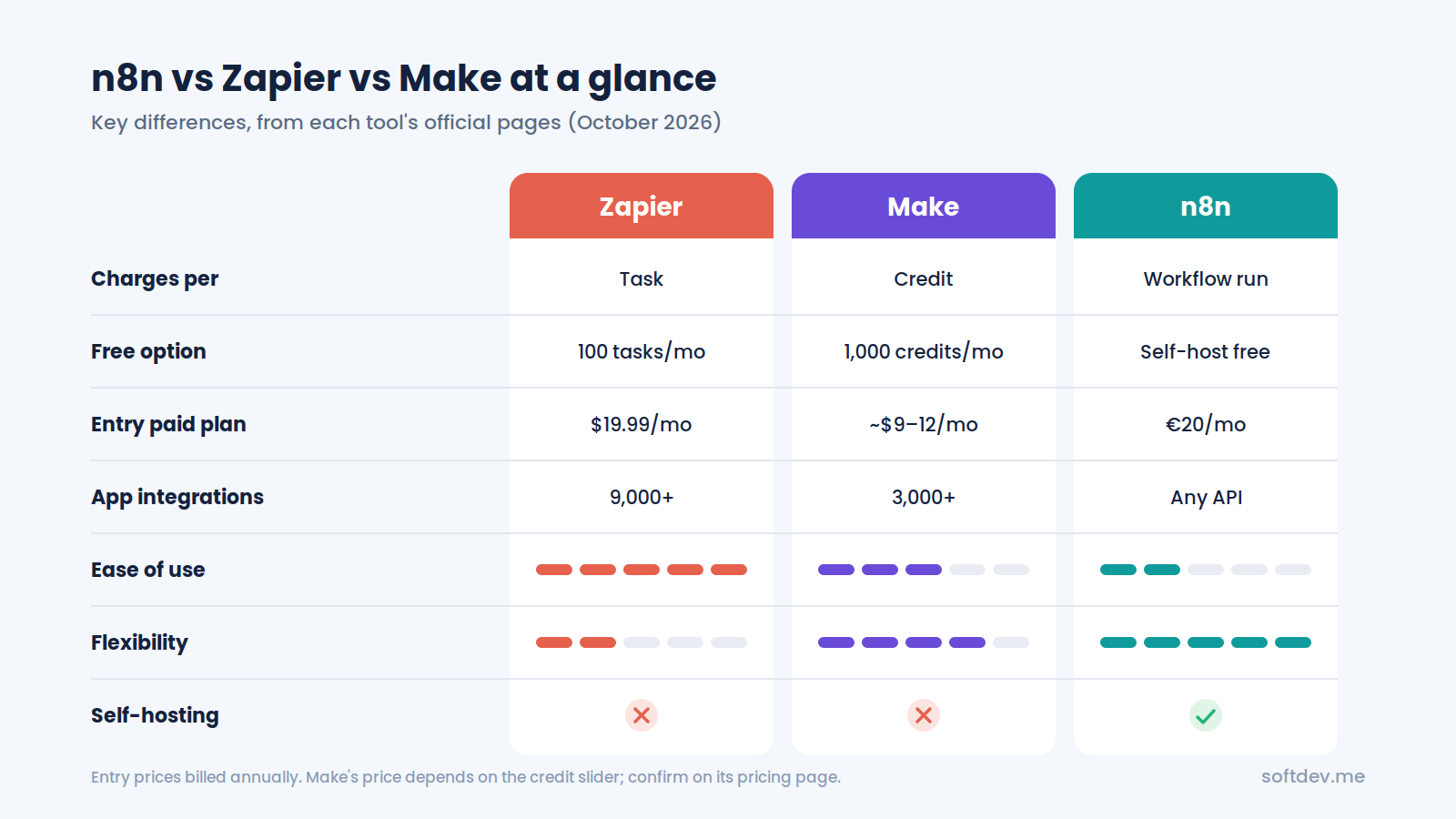
| Zapier | Make | n8n | |
|---|---|---|---|
| Best for | Non-technical teams who want speed | Visual builders who want more power | Technical teams who want full control |
| How it charges | Per task (each completed action) | Per credit (most module actions use 1) | Per execution (one full workflow run) |
| Free option | 100 tasks/month | 1,000 credits/month | Free self-hosted Community Edition |
| Entry paid plan | $19.99/month billed annually, 750 tasks | Around $9 to $12/month billed annually, 10,000 credits | €20/month billed annually, 2,500 executions |
| Number of app integrations | 9,000+ | 3,000+ | Fewer built-in nodes, but any API works |
| Learning curve | Easiest | Medium | Steepest |
| Code steps | Yes | Limited | Yes, JavaScript and Python |
| Self-hosting | No | No | Yes |
Prices from each tool's official pages, checked in October 2026. Make's page shows prices through a credit slider, so check the current figure there.
Ease of use
Zapier is the easiest. You pick a trigger, pick an action, map a few fields, and you are done. Most people can build their first Zap in minutes without any training.
Make takes a bit more learning. The visual canvas is great once you understand it, and it makes complex flows easier to follow. But concepts like iterators, aggregators, and routers take time to get comfortable with.
n8n is the most technical. The editor is visual, but to get the most out of it, you need to be comfortable with data structures, APIs, and sometimes a little code. For developers, that is a strength. For a non-technical marketing team, it can be a barrier.
A simple rule: the more technical your team, the
more n8n makes sense. The less technical, the more Zapier makes sense.
Pricing compared
This is where the three tools really differ. The headline prices look similar, but each tool counts usage in a completely different way, and that changes your bill a lot as you grow.
How Zapier charges
Zapier charges per task. A task is one action your Zap completes, such as creating a CRM contact or sending an email. The Free plan includes 100 tasks a month. Professional starts at $19.99 a month billed annually for 750 tasks, and Team starts at $69 a month billed annually (Zapier).
One helpful detail: built-in logic steps like Filters, Paths, and Formatter do not count as tasks. But every real action does, so a Zap with five actions uses five tasks each time it runs.
How Make charges
Make charges per credit. Each module action in a scenario uses credits, and most actions use one. Reading data, searching, creating, updating, and transforming data all count. Routers and error handlers are free (Make).
The Free plan includes 1,000 credits a month. Paid plans start at around $9 to $12 a month billed annually for 10,000 credits, depending on when you check. Unused credits expire at the end of each term.
How n8n charges
n8n charges per execution. An execution is one full run of a workflow, no matter how many steps it has (n8n). A 3-step workflow and a 30-step workflow cost the same per run.
On n8n Cloud, Starter is €20 a month billed annually for 2,500 executions, and Pro is €50 a month for 10,000 executions. You can also self-host the free Community Edition, where you only pay for your own server.
A real example
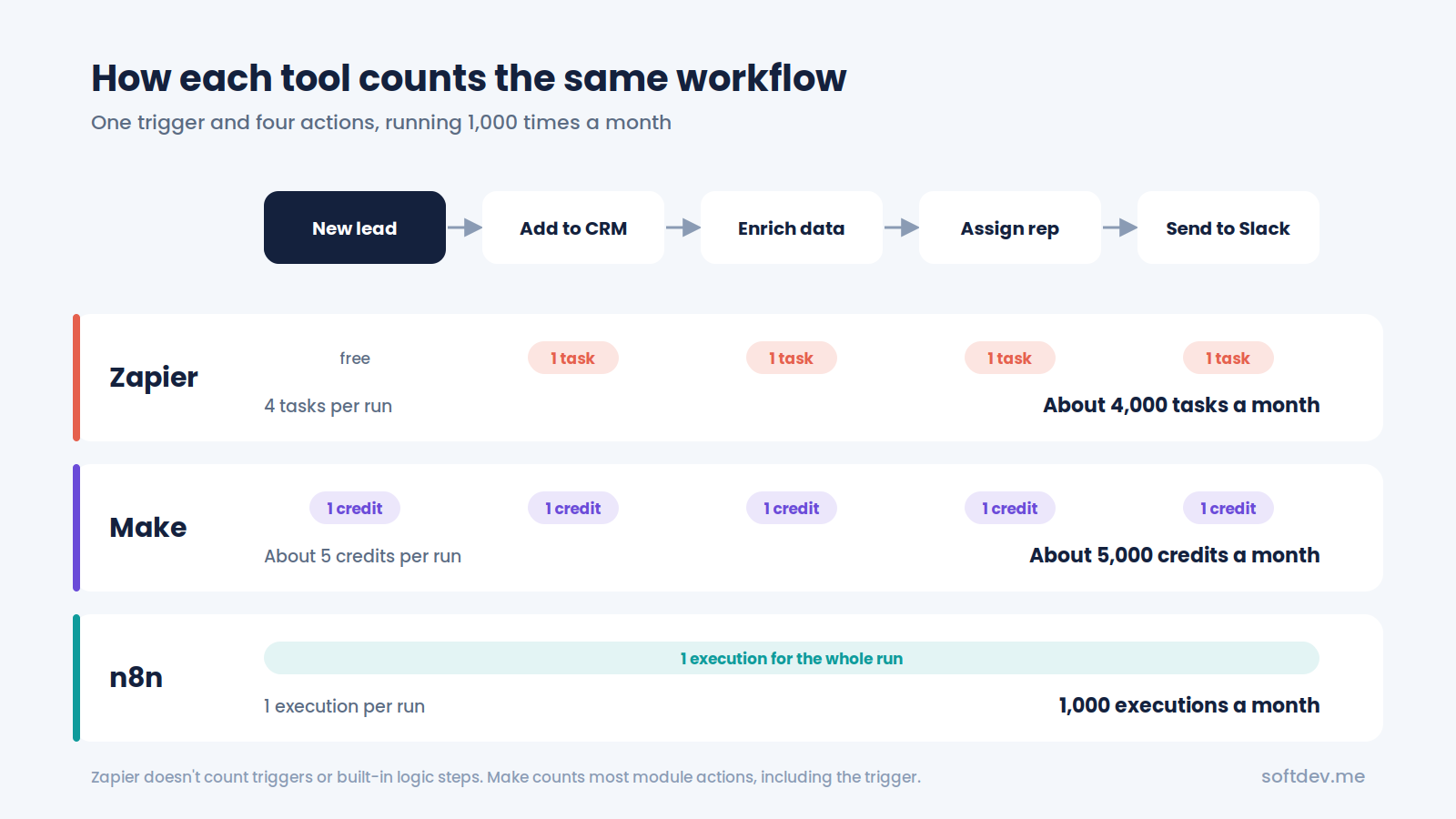
Let's say you have a workflow with one trigger and four actions: a new lead comes in, it gets added to your CRM, enriched with company data, assigned to a rep, and sent to Slack. It runs 1,000 times a month.
| Zapier | Make | n8n | |
|---|---|---|---|
| How usage is counted | 4 tasks per run | About 5 credits per run (trigger plus 4 actions) | 1 execution per run |
| Monthly usage | About 4,000 tasks | About 5,000 credits | 1,000 executions |
| Plan that covers it | A higher Professional task tier, well above the 750-task entry plan | Entry paid plan (10,000 credits) | Starter (2,500 executions) |
The same workflow fits comfortably in the entry plans for Make and n8n, while on Zapier it needs a much higher task tier. And the gap gets bigger as your workflows get longer, because Zapier and Make count every step, while n8n counts the whole run once.
Integrations
Zapier has the most. With 9,000+ apps, if a tool exists, Zapier probably connects to it, and those integrations are maintained by Zapier as apps change.
Make has fewer, but plenty. Its 3,000+ apps cover most popular business tools, and you can build custom apps to connect any service with a public API.
n8n has fewer built-in integrations, but connects to anything. If n8n does not have a ready-made node for a tool, you can use the HTTP Request node to call its API directly, or write a code step. For technical teams, this means there is almost nothing n8n cannot connect to. For non-technical teams, it means more setup work when a ready-made node is missing.
AI and advanced features
All three tools now have strong AI features, but they work differently.
- Zapier has AI by Zapier steps, Zapier Agents, Copilot for building Zaps, and Zapier MCP for using your Zaps from AI chat tools. AI steps count as 1, 3, or 5 tasks depending on the model you choose.
- Make offers AI agents, an AI assistant called Maia, and an MCP server. AI modules can use more than one credit per action.
- n8n includes AI Agent nodes, MCP server and client support, and human approval for tool calls on every plan. You can also write JavaScript or Python inside any workflow and connect to any AI model you want.
For simple AI tasks like summarizing an email, all three work well. For building real AI agents that use tools, remember context, and connect to custom systems, n8n gives you the most control.
Self-hosting and data control
This is where n8n stands apart.
- Zapier and Make are cloud-only. Your data runs through their servers.
- n8n can run on n8n's cloud, which is hosted in the EU, or on your own server. When you self-host, your data stays wherever you choose to host it (n8n).
For businesses in healthcare, finance, or anyone with strict data rules, self-hosting can be a big deal. The trade-off is that you are responsible for keeping the server running, secure, and up to date.
Which one should you choose?
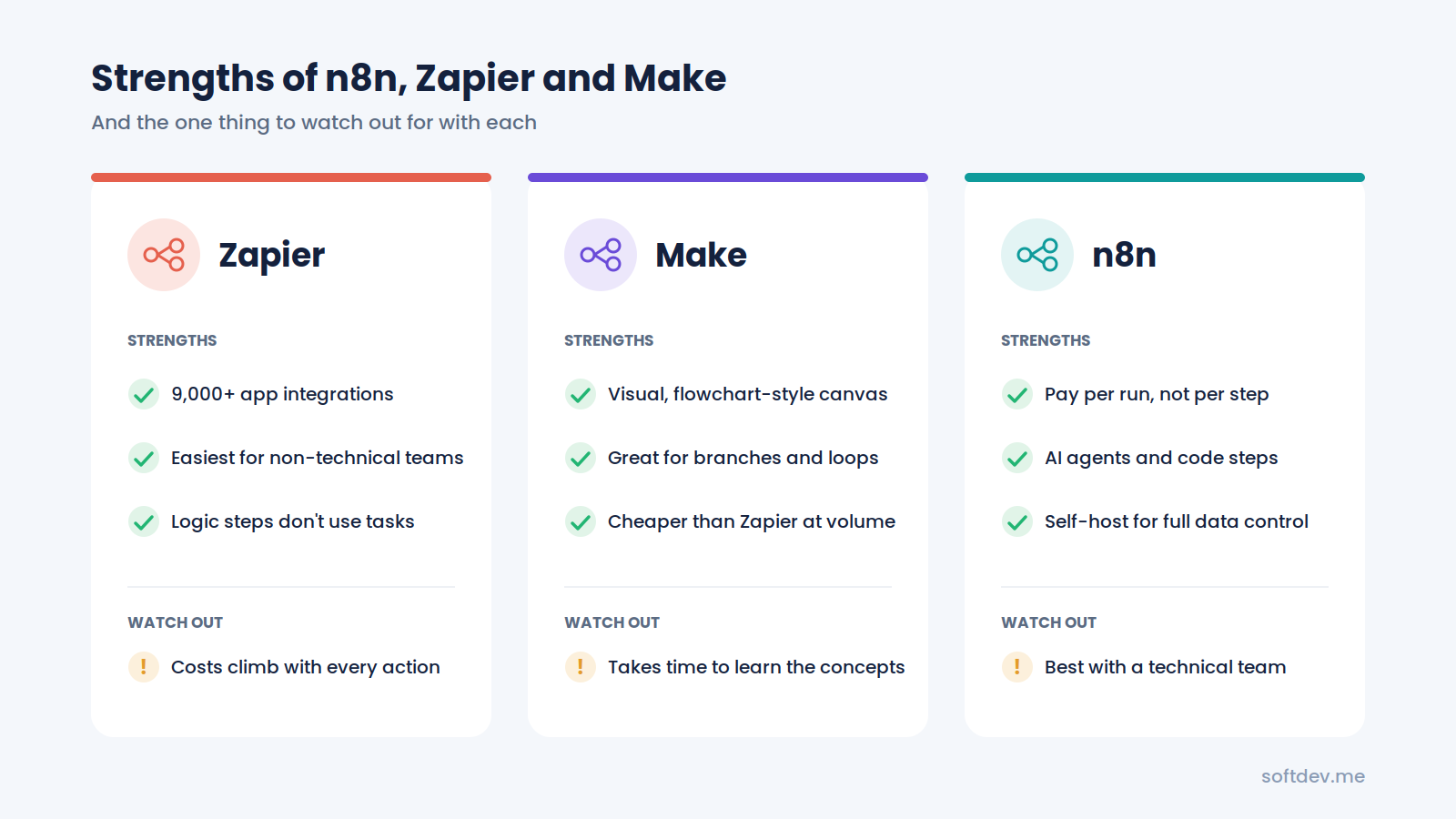
There is no single winner. The right tool depends on who will build the automations and how much they will run.
Choose Zapier if:
- Your team is non-technical and wants to build automations themselves.
- You need to connect to less common apps that only Zapier supports.
- Your workflows are simple and run a few hundred times a month.
- Speed of setup matters more than cost.
Choose Make if:
- You want more power than Zapier without writing code.
- Your workflows have branches, loops, or a lot of data transformation.
- You want lower costs than Zapier at medium volume.
- You like seeing your whole workflow on one visual canvas.
Choose n8n if:
- You have a developer or a technical partner.
- Your workflows are long, complex, or run thousands of times a month.
- You are building AI agents or connecting to custom APIs.
- You need to self-host for data privacy or compliance reasons.
Quick guide by use case:
| Use case | Our usual pick | Why |
|---|---|---|
| Simple marketing automations for a small team | Zapier | Fastest to set up, no training needed |
| Multi-step data syncing between business tools | Make | Visual, powerful, and affordable |
| AI voice agents and AI chatbots | n8n | AI agent nodes, code steps, any API |
| High-volume CRM syncs and back-office automation | n8n | Pay per run, not per step |
| Healthcare or regulated data | n8n (self-hosted) | Data stays on your own server |
Many businesses also mix tools. It is common to see a marketing team using Zapier for simple tasks while the operations team runs heavier workflows in n8n.
Why we use n8n for most client projects
At SoftDev, we have worked with all three tools, but n8n is our go-to for most client builds. The main reason is that our projects usually involve AI voice agents, custom APIs, and high-volume syncs, which is exactly where n8n is strongest.
Here are two examples:
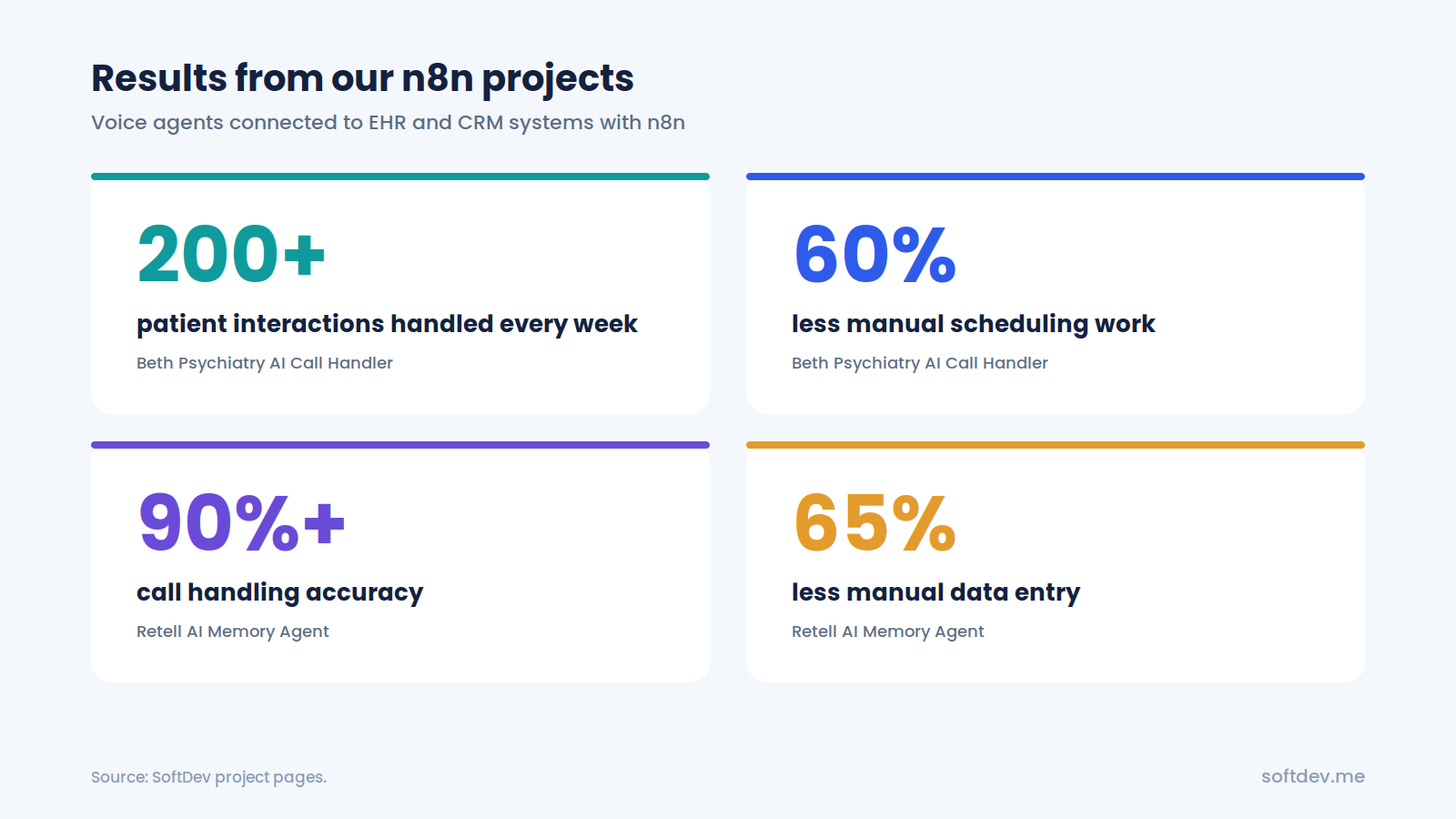
Beth Psychiatry AI Call Handler. We used n8n and Python to connect an AI voice agent to Tebra, the practice's EHR and scheduling system. The agent looks up real patient records and appointment slots during the call. It now handles 200+ patient interactions a week and has cut manual scheduling work by 60% (project page).
Retell AI Memory Agent. We built an inbound voice agent that remembers past conversations, then used n8n to sync every call into GoHighLevel automatically. The project reduced manual data entry by 65% (project page).
Neither of these would have been practical in Zapier. Each call runs through many steps, including API lookups, AI processing, and CRM updates. On a per-task tool, that cost adds up fast. In n8n, each call is a single execution, and we can write custom logic wherever we need it.
That said, we still recommend Zapier or Make when they are the better fit. If a client's team wants to build and manage simple automations themselves, Zapier is often the right answer.
Conclusion
n8n, Zapier, and Make all do the same core job, but they are built for different people and they charge in very different ways.
Zapier is the easiest and has the most integrations, which makes it great for non-technical teams with simple workflows. Make gives you more power and better value at medium volume, with a visual builder that makes complex flows easier to follow. n8n is the most flexible and the most affordable at scale, especially for AI agents and custom integrations, but it works best with a technical team or partner behind it.
Before you choose, ask yourself three questions: Who will build and maintain the automations? How many times will they run each month? Do you need AI agents, custom code, or self-hosting? Your answers will usually point straight to the right tool.
Frequently asked questions
Is n8n cheaper than Zapier?
Usually, yes, especially for multi-step workflows. Zapier charges for each action, while n8n charges once per workflow run no matter how many steps it has. You can also self-host n8n's Community Edition for free and only pay for your server.
Is Make better than Zapier?
It depends on your team. Make is better for complex, branching workflows and is usually cheaper at medium volume. Zapier is easier to learn and connects to more apps.
Is n8n free?
The Community Edition is free to self-host. n8n's cloud plans start at €20 a month billed annually for 2,500 executions.
Do I need to know how to code to use n8n?
Not for simple workflows. But n8n is most powerful when you can work with APIs and write small code steps, so technical knowledge helps a lot.
Can I switch from Zapier to n8n later?
Yes, but workflows have to be rebuilt, since there is no direct import between the tools. Many teams move their most expensive or complex Zaps first and keep simple ones in Zapier.